Troika! Backgrounds & Monsters in Typst
I channeled my momentary Mars obsession into a Troika! hack, despite not having nearly enough experience with Troika! to justify it. Thanks to my beloved Typst, I was able to slap together a procedural layout for my half-baked ideas really quickly.
Troika!'s core building blocks are its character backgrounds and monsters, both of which follow a simple formula. Structured text that is repeated many times is a case where Typst really shines, because you can automate the layout rather than adjusting by hand for each of 36 backgrounds or whatever.
Previously, I shared simple .csv import code to populate a bestiary. For this project, I opted to store monsters and backgrounds in a .yaml file. The advantage to .yaml is that it feels much more natural to read & write, and handles line breaks and large blocks of text much better.
The bestiary yaml was structured as follows:
- Name: Banth
  Skill: 10
  Stamina: 17
  Init: 5
  Armor: 0
  Damage: as Large Beast
  Mien:
    - Playful
    - Territorial
    - Languid
    - Hunting
    - Agressive
    - Sadistic
  Desc: An extremely deadly leonine predator known to prowl the mountains and hills surrounding the dead seas of Mars.
  Quote:
    Text: >
        Its long, lithe body is supported by ten powerful legs, its enormous jaws are equipped, like those of the calot, or Martian hound, with several rows of long needle-like fangs; its mouth reaches to a point far back of its tiny ears, while its enormous, protruding eyes of green add the last touch of terror to its awful aspect.
    Attribution: gods_of_mars
  Source:
  Image:
    Src: /public/assets/Idraluna/Banth.svg
    Width: 80
And for backgrounds I did this:
- Name: "Terran Smuggler"
  Desc: "In addition to the soldiers & scientists, Terran colonization has introduced a menagerie of lowlifes & desperadoes to Mars, one of which is you."
  Skills:
    - 2 Sneak
    - 1 Gambling
    - 1 Fist fighting
    - 1 Gun fighting
    - 1 Disguise
    - 1 Locks
    - 1 Awareness
  Possessions:
    - Trusty blaster pistol
    - Leather jacket
    - Dime bag of Martian cannabis
  Image: /public/assets/Idraluna/Smuggler.svg
  Imgwidth: .65
Most of the fields are pretty self-explanatory, but some notes:
- Prefixing each entry with a
-character causes Typst to read the yaml in as a nested array, which is slightly easier to parse. - Entries can be numbers (as in
Stamina), strings (as inDesc), or lists (as inMien), which in turn can have string or number entries. - For large blocks of text, use the
>character and then indent the paragraphs below it. - If your text contains apostrophes or colons, you will need to wrap the string in quotes.
- You don't strictly need to list every field for every entry, though this depends on the code used to parse the yaml file.
So, to turn the raw monster and background data into nicely-rendered layouts, I used the following code in my main .typ file.
For monsters:
#let bestiary_yaml = yaml("Bestiary.yaml")

#for beast in bestiary_yaml {
  box(inset: (y: 1em),  grid(columns: 2, gutter: 1em,
    [=== #beast.Name
    #eval(beast.Desc, mode: "markup")

    #if "Special" in beast.keys() [==== Special
    #beast.Special]

    #if beast.Image.Src != none {figure(placement: auto, caption: none, image(beast.Image.Src, width: beast.Image.Width * 1%))} else if beast.Quote.Text != none {quote(attribution: cite(label(beast.Quote.Attribution)), block: true, eval(beast.Quote.Text, mode: "markup"))}
  ], [
    #smallcaps([Skill: #beast.Skill]) \
    #smallcaps([Stamina: #beast.Stamina]) \
    #smallcaps([Initiative: #beast.Init]) \
    #smallcaps([Armor: #beast.Armor]) \
    #smallcaps([Damage #beast.Damage]) \

    ==== Mien

    #enum(..beast.Mien)
  ]
  ) +
  if beast.Quote.Text != none and beast.Image.Src != none {quote(attribution: cite(label(beast.Quote.Attribution)), block: true, eval(beast.Quote.Text, mode: "markup"))} +
  if beast.Source != none {cite(label(beast.Source), form: none)}
  )

  v(1fr)
}
And for backgrounds:
#let background_yaml = yaml("Backgrounds.yaml")
#let background_count = counter("bg")

#for background in background_yaml {
  background_count.step()
  let info = grid(
    columns: 2, gutter: 1em,
    [
      === #context dxy_map(background_count.get().at(0)) #background.Name

      ==== Advanced Skills
      #for skill in background.Skills [#skill \ ]

      #if "Special" in background.keys() [
        ===== Special
        #background.Special
      ]
    ],
    [
      #eval(background.Desc, mode: "markup")

      ==== Possessions
      #list(..background.Possessions)
    ]
  )
  box(inset: (y: 1em),
  if background.Image != none {
    grid(columns: (3fr, if "Imgwidth" in background.keys() {background.Imgwidth * 1fr} else {1fr}), gutter: 1em,
      info,
      figure(image(background.Image))
    )
  } else {info})
  v(1fr)
}
The results are as follows:
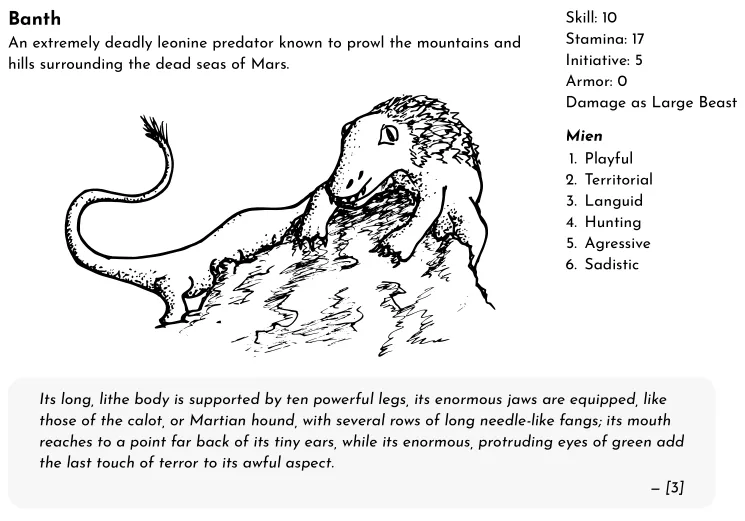
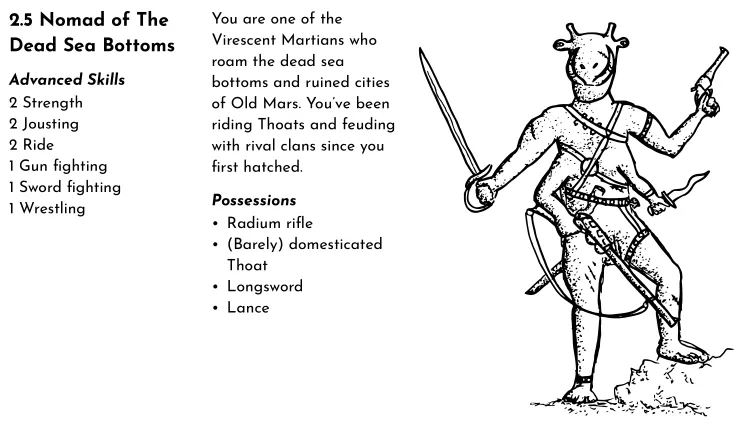
To break it down:
- Both begin by loading the
.yamlfile using theyaml()function in Typst. This reads the data and stores it in memory as an array object. - Both use a
forloop to iteratively display each entry in their respective yaml files. In the for loop, we designate each entry asbackgroundfor backgrounds andbeastfor the bestiary. We can then access and print the sub-fields by appending as so:#background.Name, or#beast.Skill. To access a nested sub-field, just append the sub-field, e.g.#beast.Image.Src. - Typst will throw an error if you try to use an empty field. Thus, I use
ifstatements to check if optional fields are filled out. For example, the line#if "Special" in beast.keys() [==== Special \ #beast.Special]says: "If the bestiary entry has a field called 'Special', display a content block with a level-4 heading that says 'Special' and then the description of the special ability below it."- The above is the most robust way to check, as it allows for empty fields to be missing entirely from an entry. In some places, though, I use
#if background.Image != nonewhich will throw an error if there is nobackground.Imagefield.
- The above is the most robust way to check, as it allows for empty fields to be missing entirely from an entry. In some places, though, I use
- Items in lists, like miens, skills, and possessions can be easily rendered by using the
#enum()function for numbered lists or#list()function for bullet lists. When you use these functions, you have to use the..operator to "unpack" the array object into a sequential series of function inputs. Thus, the code#list(..background.Possessions)is equivalent to: "for each item in thebackground.Possessionsarray, treat it as an input to the#list()function to display it as a bullet item." - Because Troika! backgrounds and monsters are usually laid out with the lists (miens, skills, items) next to the descriptive text, I used the
#grid()function to do the same in Typst.- The one place I got fancy here was in the backgrounds, where I used nested grids to display pictures to the left of the text if the image field isn't blank.
Additional notes:
- Normally, it's enough to just display the field (e.g.
#beast.Name), but for full formatting options you can tell Typst to parse the field as Typst markup code by using#eval(beast.Desc, mode: "markup"). This allows one to italicize, bold, add footnotes, etc. - Each entry is wrapped in a
#box()function. This prevents Typst from breaking entries across two pages. I think this looks nicest, but if you have long entries you could change it to a#block()to allow page-breaking. The#v(1fr)at the end tells Typst to space out entries evenly across the page, which looks better when there's a lot of whitespce. - The backgrounds use the dXY code I wrote about here.
Anyways, it might seem a bit convoluted, but the beauty is that writing up new entries into the .yaml file is a lot easier than manually typing the text into a layout template. And, if I decide that WARHOON! would be better as an A5 zine I can always reconfigure the display functions to something that works best for the new format.